
2024-11-11
if Statements (Conditional Branching)
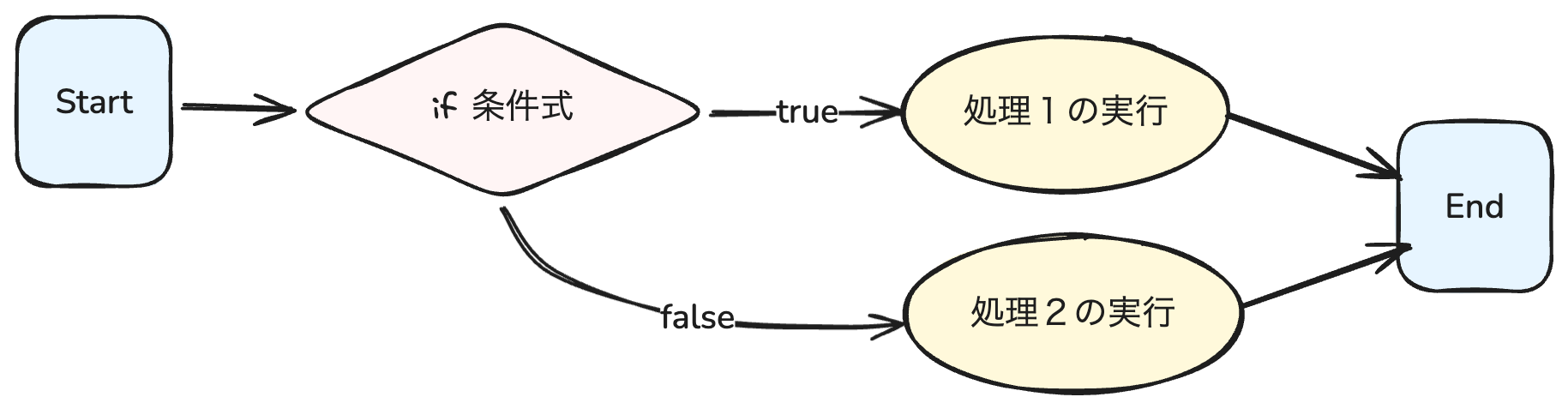
The if statement is a syntax used to branch processing based on conditions. For example,
- Execute process 1 if the condition is
true - Execute process 2 if the condition is
false
In this way, you can branch processing based on conditions.
if (condition) {
    // Code to execute if the condition is true
} else {
    // Code to execute if the condition is false
}
Practice 3.3.1
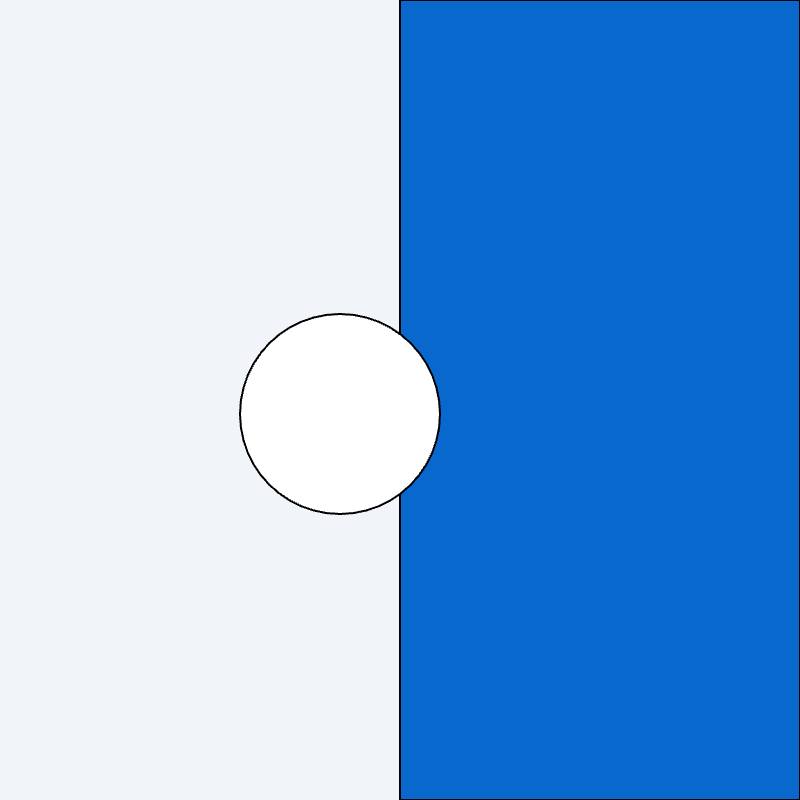
Draw a boundary line in the center of the screen and create a program that changes the color of the circle when the mouse crosses the boundary line.
Based on the program learned in §2.3 - Animation, which draws a circle at the mouse position, create the program following these steps:
function setup() {
    createCanvas(400, 400);
    background('#F1F5F9');
}

function draw() {
    circle(mouseX, mouseY, 100);
}
Next, update the following elements:
- Since we don't want to draw the trail of the circle, move the
background()function inside thedraw()function. - Fill the right half of the screen with blue using the
rect()function.
function setup() {
    createCanvas(400, 400);
}

function draw() {
    background('#F1F5F9'); // Set background color
    fill('#0868CE');
    rect(width / 2, 0, width / 2, height); // Draw rectangle on the right half
    fill(255);
    circle(mouseX, mouseY, 100);
}
Next, add the process to change the color of the circle when the mouse crosses the boundary line. This is the most important part.
function setup() {
    createCanvas(400, 400);
}

function draw() {
    background('#F1F5F9'); // Set background color
    fill('#0868CE');
    rect(width / 2, 0, width / 2, height); // Draw rectangle on the right half

    // If the mouse's x-coordinate is "to the left of the center of the screen", draw the circle in black, otherwise in white
    if (mouseX < width / 2) {
        fill(0);
    } else {
        fill(255);
    }

    circle(mouseX, mouseY, 100);
}
Let's recall the template of the if statement.
if (condition) {
    // Code to execute if the condition is true
} else {
    // Code to execute if the condition is false
}
In this case,
| Condition | When true | When false |
|---|---|---|
mouseX is to the left of the center of the screen | Draw circle in black | Draw circle in white |
mouseX < width / 2 | fill(0); | fill(255); |
This process is implemented by writing
if (mouseX < width / 2) {
    fill(0);
} else {
    fill(255);
}Comparison Operators
In the previous code example, the if statement used a _condition_. This condition can use comparison operators. With comparison operators, you can compare conditions such as the following:
==: Equal to!=: Not equal to>: Greater than<: Less than>=: Greater than or equal to<=: Less than or equal to
Using these operators, you can compare whether values are equal, greater, etc. Here is an example using comparison operators.
let x = 10;
let y = 20;

if (x > y) {
    console.log('x is greater than y');
} else {
    console.log('x is not greater than y');
}
Try changing the condition to other operators and see how it works.
Practice 3.3.2
This time, based on the program learned in §2.3 - Animation, which draws circles at random positions, create a program that changes the color of the circles by adding conditions.
function setup() {
    createCanvas(400, 400);
    background('#F1F5F9');
}

function draw() {
    let x = random(width);
    let y = random(height);
    let r = random(50);
    circle(x, y, r);
}
The conditions for changing the color of the circles are as follows:
- If the distance between the center of the circle and the center of the canvas is less than 80 pixels, the color is pink
- If the distance between the center of the circle and the center of the canvas is between 80 and 160 pixels, the color is yellow
- Otherwise, the color is white
So, how should we write the condition? First, we need to calculate the distance from the center of the circle to the center of the canvas. Then, we can compare whether that distance is greater or less than 100 pixels.
The distance between two points can be easily calculated using the dist() function. For example, the distance between point (0, 0) and point (100, 100) can be calculated as follows:
let d = dist(0, 0, 100, 100);
print(d);
>>> 141.4213562373095
Here is an example program that calculates the distance between the mouse coordinates and the center of the canvas. Feel free to read the code if you're interested.
Now, let's add the condition and complete the program to change the color of the circles.
function setup() {
    createCanvas(windowWidth, windowHeight);
    background('#F1F5F9');
}

function draw() {
    let x = random(width);
    let y = random(height);
    let r = random(50);
    let cx = width / 2;
    let cy = height / 2;
    let d = dist(x, y, cx, cy);

    if (d < 80) {
        fill('#F9A8D4');
    } else if (d < 160) {
        fill('#F9D8A8');
    } else {
        fill('#FFFFFF');
    }

    circle(x, y, r);
}