
2024-11-11
Variables and Calculations
In the previous section, we learned how to manage values and control the program using variables. This time, we will learn how to update the values stored in variables by performing calculations. It may be hard to imagine now, but by adding some calculations when updating values, you can create very flexible programs.
Practice 3.2.1: Drawing a Circle in the Center of the Canvas
The following code draws two circles in the center of the canvas. It uses fixed values to draw the circles without any variables or calculations.
function setup() {
    createCanvas(520, 320);
    background('#D6E3ED');
    circle(200, 160, 100);
    circle(320, 160, 100);
}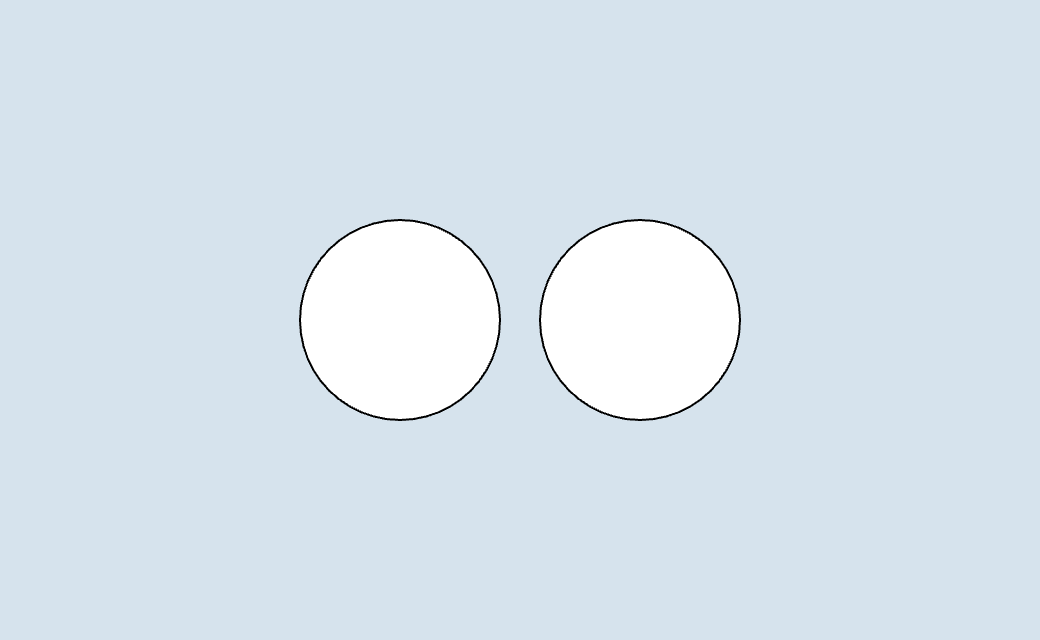
If you change the size of the canvas, the position of the circles will shift from the center. So, let's modify the code to calculate the center coordinates of the circles and draw them in the center of the canvas.
function setup() {
    createCanvas(520, 320);
    background('#D6E3ED');

    let cy = height / 2; // "/" means division
    let cx = width / 2; // "/" means division
    circle(cx + 60, cy, 100); // "+" means addition
    circle(cx - 60, cy, 100); // "-" means subtraction
}
The drawing content does not change, but now the circles are always drawn in the center of the screen, even if you change the width and height of the canvas. Try changing the width and height of the canvas to 400. The circles will continue to be drawn in the center of the screen.
Arithmetic Operations
In the previous code, operators such as /, +, and - were used. These are arithmetic operators, which are used for addition, subtraction, multiplication, and division. Here are the operators available in JavaScript.
| Operator | Description | Example | Result |
|---|---|---|---|
| :------: | -------------- | -------- | :----: |
+ | Addition | 1 + 2 | 3 |
- | Subtraction | 3 - 1 | 2 |
* | Multiplication | 2 * 3 | 6 |
/ | Division | 6 / 2 | 3 |
** | Exponentiation | 2 ** 3 | 8 |
% | Remainder | 5 % 2 | 1 |
The order of operations is generally the same as in mathematics. You can also use parentheses () to specify the priority of calculations.
let x = 10 + 4; // 14
let y = 10 - 4; // 6
let z = 6 * 5; // 30
let w = 12 / 3; // 4
let v = 3 ** 2; // 9
let m = 10 % 3; // 1
let u = (10 + 4) * 2; // 28
Practice 3.2.2: Drawing Stairs
This time, let's draw a staircase using horizontal rectangles. First, let's write a program without calculating or updating variable values.
function setup() {
    createCanvas(480, 320);
    background('#D6E3ED');

    let h = 50;
    let x = 0;

    rect(x, 80, 200, h);
    rect(x, 130, 300, h);
    rect(x, 180, 400, h);
}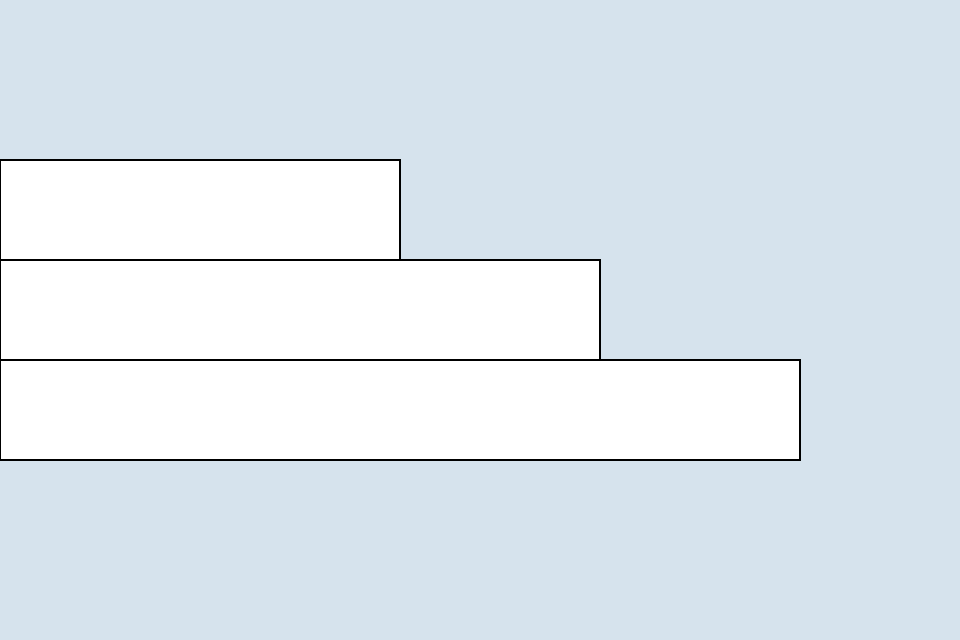
The problem with this code is that you have to manually calculate and update the y-coordinates of the stairs (80, 130, 180, ...) and the width (200, 300, 400, ...). This sample code is small, and the increments are simple values like 50 and 100, but if the number of steps were 100 and the increment value was 173, for example, the likelihood of making a calculation error would increase.
Since the y-coordinates and width of the stairs increase in a regular pattern, you can create error-free code by mechanically updating the variable values.
function setup() {
    createCanvas(480, 320);
    background('#D6E3ED');

    let h = 50;
    let x = 0;
    let w = 200;
    let y = 80;
    let step = 100;

    rect(x, y, w, h);
    w = w + step;
    y = y + h;
    rect(x, y, w, h);
    w = w + step;
    y = y + h;
    rect(x, y, w, h);
}
The changes are that the values of w and y are updated using the newly defined step and h variables. For example, w = w + step means assigning w + step to w. Let's focus on the update expressions and see how the calculations are performed.
let w = 200; // Initially 200
let step = 100; // Increase by 100

w = w + step; // Assign 200 + 100 = 300 to `w`
w = w + step; // Assign 300 + 100 = 400 to `w`
...

let y = 80; // Initially 80
let h = 50; // Increase by 50

y = y + h; // Assign 80 + 50 = 130 to `y`
y = y + h; // Assign 130 + 50 = 180 to `y`
...
Generalizing the way numbers increase and capturing the essence of the program is very important. Based on this idea, in the next chapter, we will learn how to write the same code more concisely and efficiently using "loops". Stay tuned!
Updating Variable Values
To update a variable that has been declared once, write as follows.
let x = 120;
x = x + 20; // x becomes 140
Note that = is different from the mathematical equals sign and means "assignment". In the example above, x = x + 20 means assigning the result of adding 20 to the current value of x back to x. Specifically, 120 + 20 results in 140, which is assigned to x.
This allows you to perform various operations such as addition, subtraction, multiplication, and division on the value of a variable.
let x = 120;
x = x + 20; // x becomes 140
x = x - 40; // x becomes 100
x = x * 2; // x becomes 200
x = x / 4; // x becomes 50
Simpler Update Methods (Assignment Operators)
Programmers are lazy, so they came up with a simpler way to write variable updates. These are "assignment operators". Using assignment operators, you can write the same calculations more concisely.
=: Assignment+=: Addition Assignment-=: Subtraction Assignment*=: Multiplication Assignment/=: Division Assignment
For example, x += 20 means adding 20 to x. This is equivalent to x = x + 20.
let x = 120;
x += 20; // x = 140
x -= 40; // x = 100
x *= 2; // x = 200
x /= 4; // x = 50
Special Operators ++ and --
JavaScript has special operators ++ and -- that increase or decrease the value of a variable by 1. These operators are convenient when you want to simply increment or decrement the value of a variable. They are often used in "for loops", which will be introduced in the next section, so be sure to remember them.
let x = 10;
x++; // x becomes 11
x--; // x returns to 10
Practice 3.2.3
Now, let's rewrite the code from Practice 3.2.1 using the operators we just learned to make it more concise.
function setup() {
    createCanvas(480, 320);
    background('#D6E3ED');

    let w = 200;
    let h = 50;
    let x = 0;
    let y = 80;
    let step = 100;

    rect(x, y, w, h);
    w += step;
    y += h;
    rect(x, y, w, h);
    w += step;
    y += h;
    rect(x, y, w, h);
}