
2024-11-11
This section covers the file structure of a p5.js project, the role of each file, and the process of rendering a canvas using two files.
File Structure
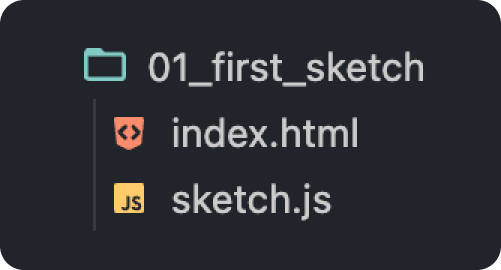
In Chapter 2, "Creating a p5.js Project", we used a VSCode plugin to create a new project. The created p5.js project "01_first_sketch" includes the following two important files by default.
`index.html`
<html>
    <head>
        <script src="https://cdn.jsdelivr.net/npm/p5@1.4.1/lib/p5.js"></script>
        <script src="sketch.js"></script>
        <title>P5.js Project</title>
    </head>
    <body>
        <main></main>
    </body>
</html>
`sketch.js`
function setup() {
    createCanvas(400, 400);
}

function draw() {
    background(220);
}
A p5.js project consists of these two HTML and JavaScript files. Let's look at their roles and relationships.
HTML File (index.html)
As explained in the previous section, HTML (HyperText Markup Language) defines the basic structure of a web page. Simply put, it describes "what to display on the web page". HTML files have the extension .html.
The index.html file includes <script> tags to load the p5.js library and the sketch file (sketch.js), as well as a <title> tag to set the web page's title.
`index.html`
<html>
    <head>
        <script src="https://cdn.jsdelivr.net/npm/p5@1.4.1/lib/p5.js"></script>
        <script src="sketch.js"></script>
        <title>P5.js Project</title>
    </head>
    <body>
        <main></main>
    </body>
</html>
Did you notice the empty main tag in the body tag of the index.html file? This main tag is prepared as a space to add the canvas where the p5.js processing results will be drawn.
JavaScript File (sketch.js)
JavaScript is a programming language that can add dynamic behavior to web pages, and p5.js is one of its libraries. It's like a toolbox for easily performing visual programming. JavaScript files have the extension .js.
The sketch.js file contains code for drawing and animating using p5.js.
`sketch.js`
function setup() {
    createCanvas(400, 400); // Add canvas
}

function draw() {
    background(220); // Set canvas background color
}
The Process of Rendering a Canvas
When you display this project in a browser, the canvas is rendered through the following process.
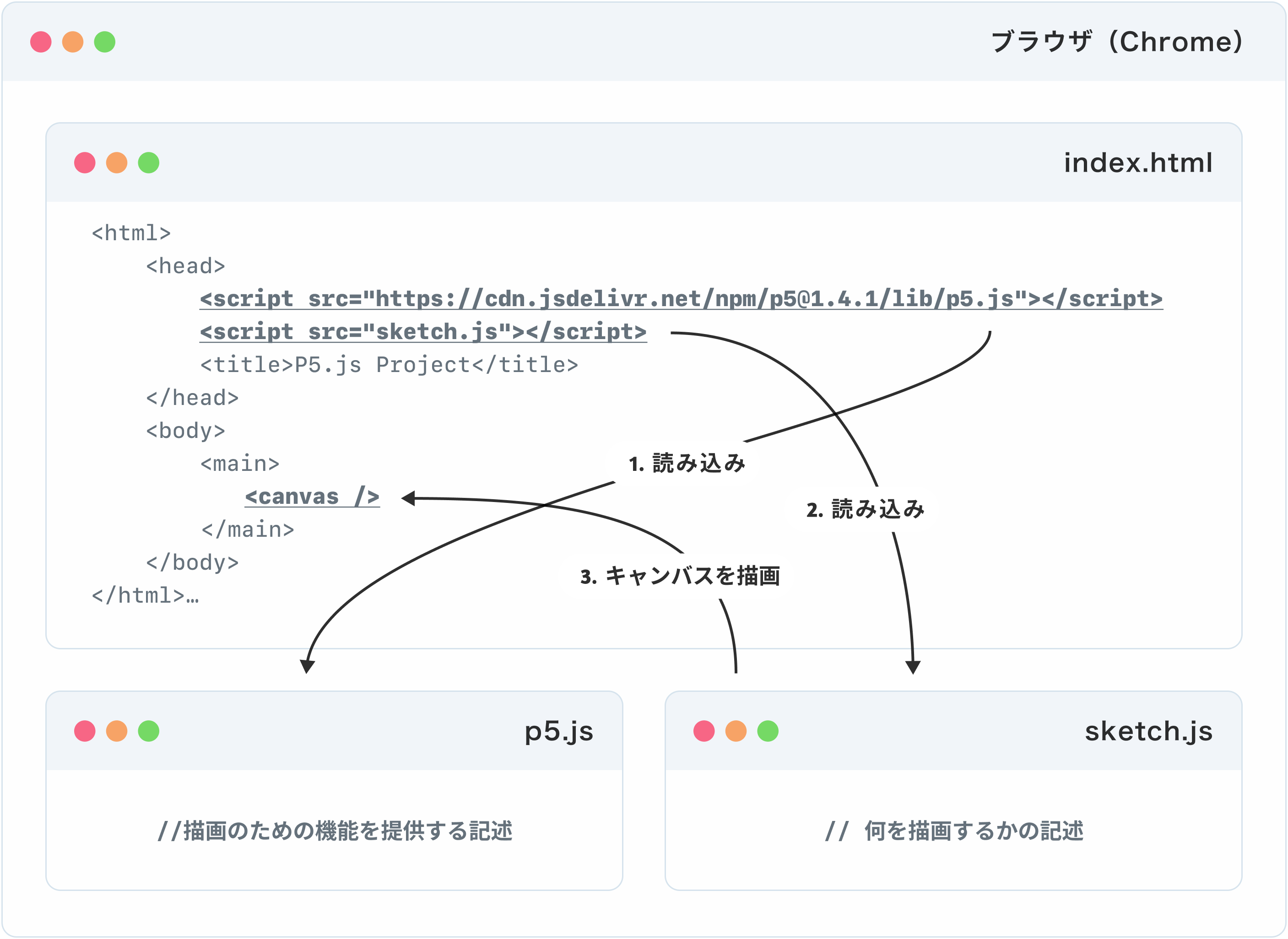
Let's look at the code in more detail.
- The browser loads the `index.html` file
Theindex.htmlfile has<script>tags to load the p5.js library and thesketch.jsfile.`html
<script src="https://cdn.jsdelivr.net/npm/p5@1.4.1/lib/p5.js"></script>
<script src="sketch.js"></script>` - Loading the p5.js library
`html
<script src="https://cdn.jsdelivr.net/npm/p5@1.4.1/lib/p5.js"></script>`
The firstscripttag loads the p5.js library from a CDN (Content Delivery Network) on the internet. The p5.js library includes many useful functions for creating canvases, drawing shapes, and performing animations. By loading this library, you can use the features of p5.js. - Loading the sketch file
`html
<script src="sketch.js"></script>`
The secondscripttag loads thesketch.jsfile. This file contains instructions on what to draw using the previously loaded p5.js library. - Executing the drawing
`js
function setup() {
createCanvas(400, 400); // Add canvas
}
function draw() {
background(220); // Set canvas background color
}`- The code in
sketch.jsfirst executes thesetup()function, which adds a canvas inside themaintag using thecreateCanvas()function. - Then, the
draw()function is repeatedly executed, updating the content drawn on the canvas.
- The code in
In this way, the HTML file (index.html) provides the basic structure of the web page, and the JavaScript file (sketch.js) defines the specific behavior of the canvas, allowing a program using p5.js to run.
This concludes this chapter.
In the next chapter, we will learn about drawing basic shapes. We will actually modify the contents of sketch.js to draw shapes. By observing how the changes in the code correspond to the results, you can experience the fun of programming!