
2025-06-03
Loops (for Statements)
In the previous chapter, you learned how to use "if" statements to change what happens based on conditions. Now, let's learn about loops, which let you repeat the same process multiple times.
In Python, the most common loops are for and while. Here, we'll start with for loops.
What is a for Loop?
A for loop is a structure for taking items from a list or range one by one and repeating the same process.
For example, imagine searching for a student named "Taro" in a table like this:
| i | Name | Status |
|---|---|---|
| 0 | Jiro | Late |
| 1 | Zenjiro | Present |
| 2 | Taro | Early |
| 3 | Santaro | Present |
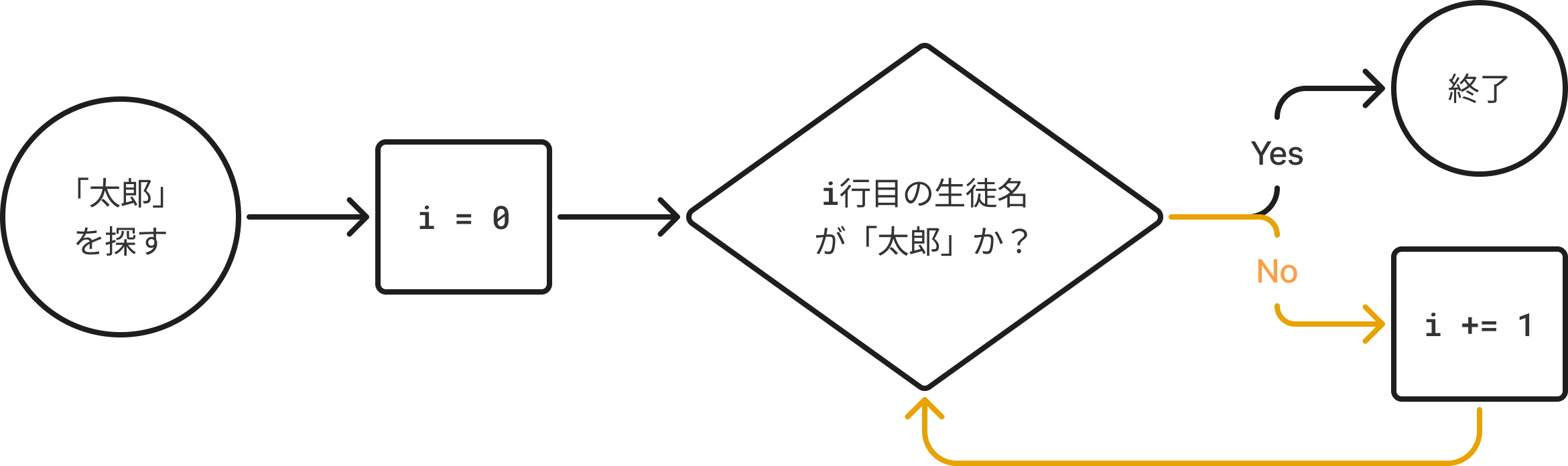
The orange flow in the diagram keeps looping with i += 1 as long as the condition is No, searching for the next student. This is what a for loop does.
Basic for Loop Structure
A for loop takes "a group of values" and repeats the same process for each one.
for variable in group_of_data:
    # Process to repeat
Example: Displaying List Elements in Order
fruits = ["apple", "orange", "banana"]

for fruit in fruits:
print(fruit)- The contents of the
fruitslist are taken one by one into the variablefruitand displayed withprint(). - The result is:
apple
orange
banana
Using range() to Repeat a Set Number of Times
If you want to repeat something a fixed number of times, use the range() function.
for i in range(5):
print(i)range(5)gives you the numbers 0, 1, 2, 3, 4.ichanges from 0 to 4.
0
1
2
3
4
Specifying Start and Step
You can write range(start, stop, step) to specify the range in detail.
for i in range(1, 6):
    print(i)
→ Displays 1 to 5 (the stop value is not included).
Practice: Calculate the Sum from 1 to 10
Let's use a for loop to calculate the sum from 1 to 10.
total = 0
for i in range(1, 11):
    total += i
print("The sum is", total)
total += imeanstotal = total + i.- It adds up the numbers from 1 to 10 in order.